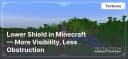
Lower Shield in Minecraft — More Visibility, Less Obstruction
Lower Shield lowers the shield in Minecraft, improving visibility and reaction time in combat.
1.3Kviews1 min
Lower Shield lowers the shield in Minecraft, improving visibility and reaction time in combat.
Main Advantages
- Better Visibility. The lowered shield no longer blocks a large portion of the screen, allowing players to see their surroundings more clearly and navigate battles more effectively. This is especially useful in intense situations where keeping track of multiple enemies or allies' movements is crucial.
- Increased Combat Efficiency. Reducing visual obstructions helps players react to threats faster and aim more precisely. You can better anticipate enemy actions and execute tactics that require quick reflexes more effectively.
- Simplicity and Convenience. The texture pack requires no complicated setup and works immediately after installation, providing an instant effect. There’s no need to adapt to new controls or adjust to radical changes—gameplay remains the same but becomes much more comfortable. The lowered shield ensures a clear view of the surroundings.
Conclusion
Lower Shield - Enhanced Combat Visibility — is a small but impactful change that makes combat in Minecraft more comfortable. Improved visibility allows players to react to threats faster without sacrificing defense, making it a great choice for any playstyle.
Published under GNU General Public License v3.0 only
Installation
A typical installation takes about 5 minutes. The flow is the same; only the loader and the matching build differ.
 How to Install a Texture Pack in MinecraftLearn how to install a texture pack in Minecraft with a simple step-by-step guide. Personalize your game with ease.Open the install guide
Gallery
Found: 10